Run Claude Code for Free with FreeLLMAPI
This AI tool can turn your workflow into a Super-power.
19 November 2026
by
 | No comments yet
What if you could experiment with hundreds of AI models without purchasing multiple expensive subscriptions?
The AI industry is moving incredibly fast. Every few weeks, a new AI model appears promising better coding, faster responses, smarter reasoning, or more powerful automation. But there is one problem: accessing these tools often means managing multiple accounts, API keys, subscriptions, and usage limits.
For developers, freelancers, students, and AI enthusiasts, these costs can quickly become a barrier.
This is where FreeLLMAPI enters the picture.
FreeLLMAPI is an open-source AI model routing platform that brings multiple AI providers together through a single API gateway. Instead of configuring different connections for every AI provider, you can manage supported models through one interface and use them with compatible AI applications.
One particularly interesting application is connecting FreeLLMAPI with Claude Code, Anthropic's AI-powered coding agent.
Let's explore how it works, how to install it, and how you can turn this technology into a practical productivity or income-generating tool.
What Is FreeLLMAPI and Why Is Everyone Interested?
FreeLLMAPI is essentially a bridge between different AI model providers and the applications you already use.
Think of it as a central control room for AI models.
Instead of connecting separately to providers such as Google, Groq, Cerebras, NVIDIA, Mistral, and other supported platforms, FreeLLMAPI allows you to configure their API keys in one local gateway.
Its key features include:
- Multiple AI models: Explore models for coding, reasoning, writing, and other supported tasks.
- Unified API access: Connect compatible applications through a single endpoint.
- Automatic failover: When a provider reaches its rate limit or becomes unavailable, the router can try another configured provider.
- Local dashboard: Manage API keys, models, routing preferences, and usage.
- Claude Code compatibility: Connect supported third-party models to the Claude Code interface.
- Open-source software: The router itself is available under the MIT licence.
The interesting part is that you don't necessarily need a paid subscription to every provider. Several providers offer free API allowances, and FreeLLMAPI helps you manage those connections.
However, remember that free allowances depend on individual providers. The router is free, but that does not mean unlimited AI inference.
Why Should You Connect FreeLLMAPI With Claude Code?
Claude Code is an AI coding agent that can understand your codebase, modify files, debug problems, execute commands, and assist with software development.
Normally, using Claude Code involves Anthropic's supported authentication and model access.
FreeLLMAPI introduces another possibility: using the Claude Code interface with compatible models from other providers.
For example, you could experiment with a reasoning model for analysing a complicated programming problem, a faster model for routine coding tasks, and another model for generating documentation.
You get to experiment with different models without constantly changing your development environment.
Important: This does not unlock free Claude Sonnet or Claude Opus subscriptions. FreeLLMAPI routes requests to supported third-party models. Their capabilities, limits, and performance vary.
How to Install FreeLLMAPI
Getting started is relatively straightforward. There are different installation options depending on your operating system.
1. Windows installation
Windows users can start with the desktop installer.
Visit https://freellmapi.pro/
Open the download section.
Download the Windows installer or ZIP package from the project's official releases.
Install and launch the application.
Open the local dashboard.
The desktop application provides a convenient way to manage your local AI gateway without manually configuring every component.
2. macOS and Linux installation
If you already use Docker, you can install the server version using the official installation command.
First, make sure Docker is installed and running.
Open your terminal and execute:
curl -fsSL https://freellmapi.co/install.sh | bash
Once installation is complete, open:
http://localhost:3001
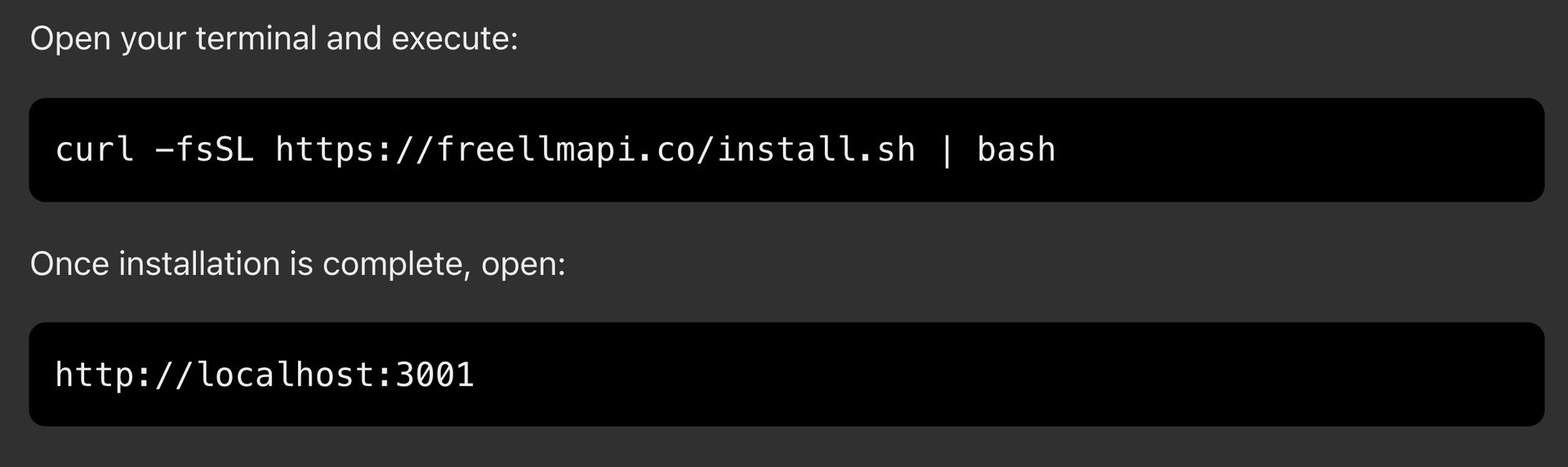
You should now be able to access your local FreeLLMAPI dashboard.
3. Connect your AI providers
This is an important step.
Open the dashboard and navigate to the Keys section.
Add API credentials from the providers you want to use. These could include supported services such as Google, Groq, NVIDIA, Cerebras, or other available providers.
You need to obtain API keys directly from the respective providers.
Once connected, FreeLLMAPI can manage these credentials and provide a unified API key for your applications.
Keep your API credentials private. Never publish them in GitHub repositories or public configuration files.
How to Use FreeLLMAPI With Claude Code
Now comes the interesting part.
Claude Code is the interface that will interact with your project, while FreeLLMAPI acts as the model gateway.
Before proceeding, install Claude Code separately using Anthropic's official installation instructions: https://code.claude.com/docs/en/overview
You should also have Node.js 20.18 or later available for the FreeLLMAPI command-line setup.
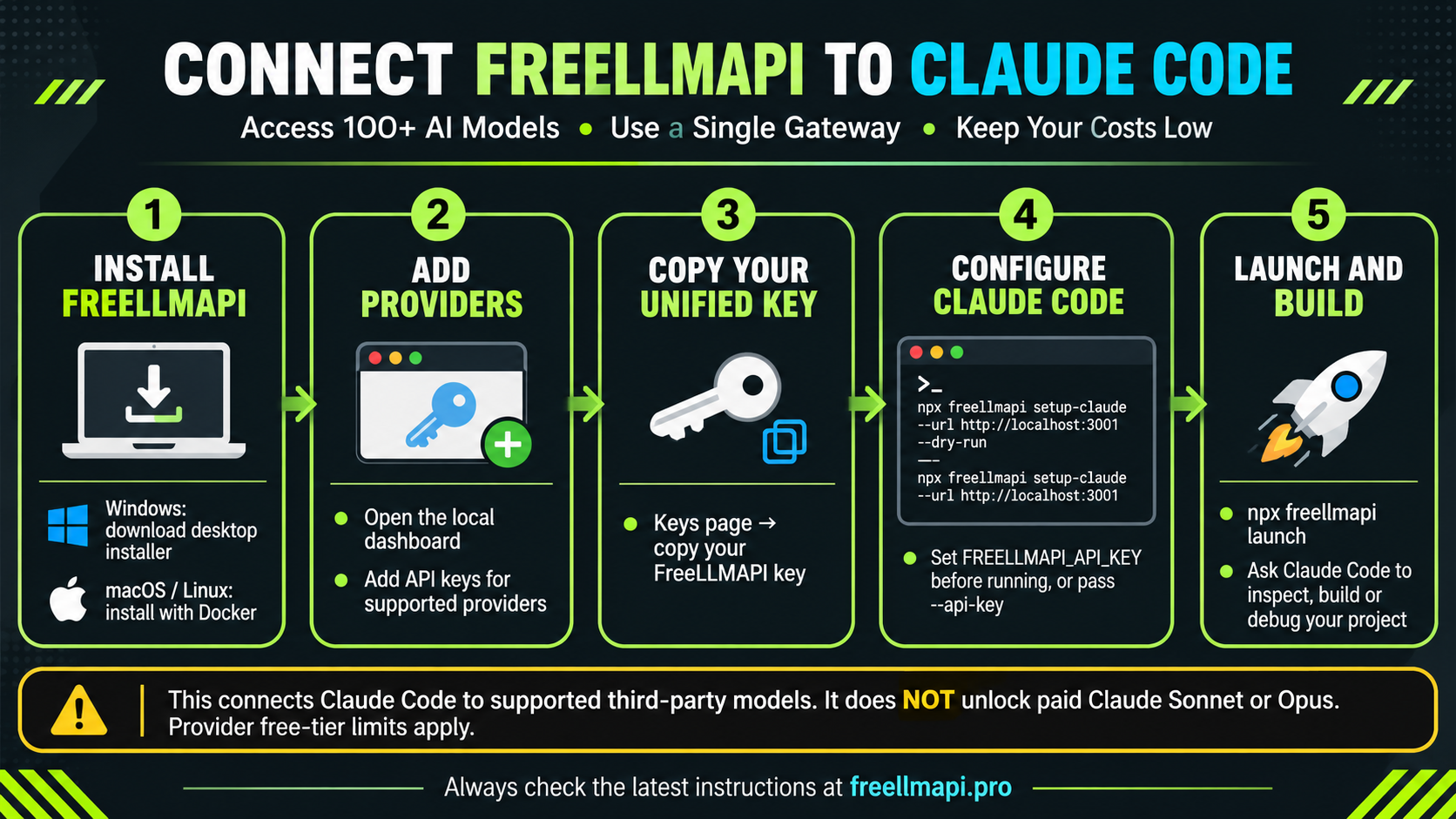
The complete workflow:
Install and launch FreeLLMAPI.
Add API keys from supported AI providers.
Copy your unified FreeLLMAPI API key.
Configure Claude Code to communicate with the local gateway.
Launch Claude Code and start building.
Connect Claude Code through the terminal
The project provides an automated configuration command.
For macOS and Linux, open your terminal and set your API key:
export FREELLMAPI_API_KEY="YOUR_UNIFIED_KEY"
First, preview the configuration changes:
npx freellmapi setup-claude \ --url http://localhost:3001 --dry-run
If the preview looks correct, execute:
npx freellmapi setup-claude \ --url http://localhost:3001
For Windows PowerShell, use:
$env:FREELLMAPI_API_KEY="YOUR_UNIFIED_KEY" npx freellmapi setup-claude ` --url http://localhost:3001 --dry-run
Remove --dry-run when you're ready to apply the configuration.
You can then launch Claude Code through the FreeLLMAPI launcher:
npx freellmapi launch
The launcher is designed to pass credentials to the Claude Code process without storing them in its configuration.
One important technical detail: Claude Code uses the Anthropic Messages API.
Its gateway address should be the server root, such as http://localhost:3001, not the OpenAI-style /v1 endpoint.
If you're using the desktop version, check its displayed Claude gateway URL. The desktop application may use http://127.0.0.1:31415 instead.
What Can You Build With It?
Once everything is connected, you can start experimenting with Claude Code and the models available through your gateway.
For example, try these prompts:
Build a website:
"Analyse my requirements and build a responsive landing page with HTML, CSS and JavaScript. Keep the code clean and mobile-friendly."
Debug an existing application:
"Inspect my project, identify potential errors, explain what is causing them, and suggest fixes before modifying any files."
Create an automation system:
"Build a Python script that reads information from a CSV file, organises the data, and generates a structured Excel report."
Create a business dashboard:
"Analyse this sales dataset and build a dashboard showing monthly revenue, best-selling products, and customer trends."
The important thing is to treat AI as a development assistant rather than blindly accepting everything it generates. Review the code, test the output, and verify important changes.
Common FreeLLMAPI Errors and How to Fix Them
You may encounter a few issues during installation or while connecting Claude Code.
Here are some common problems and their possible solutions.
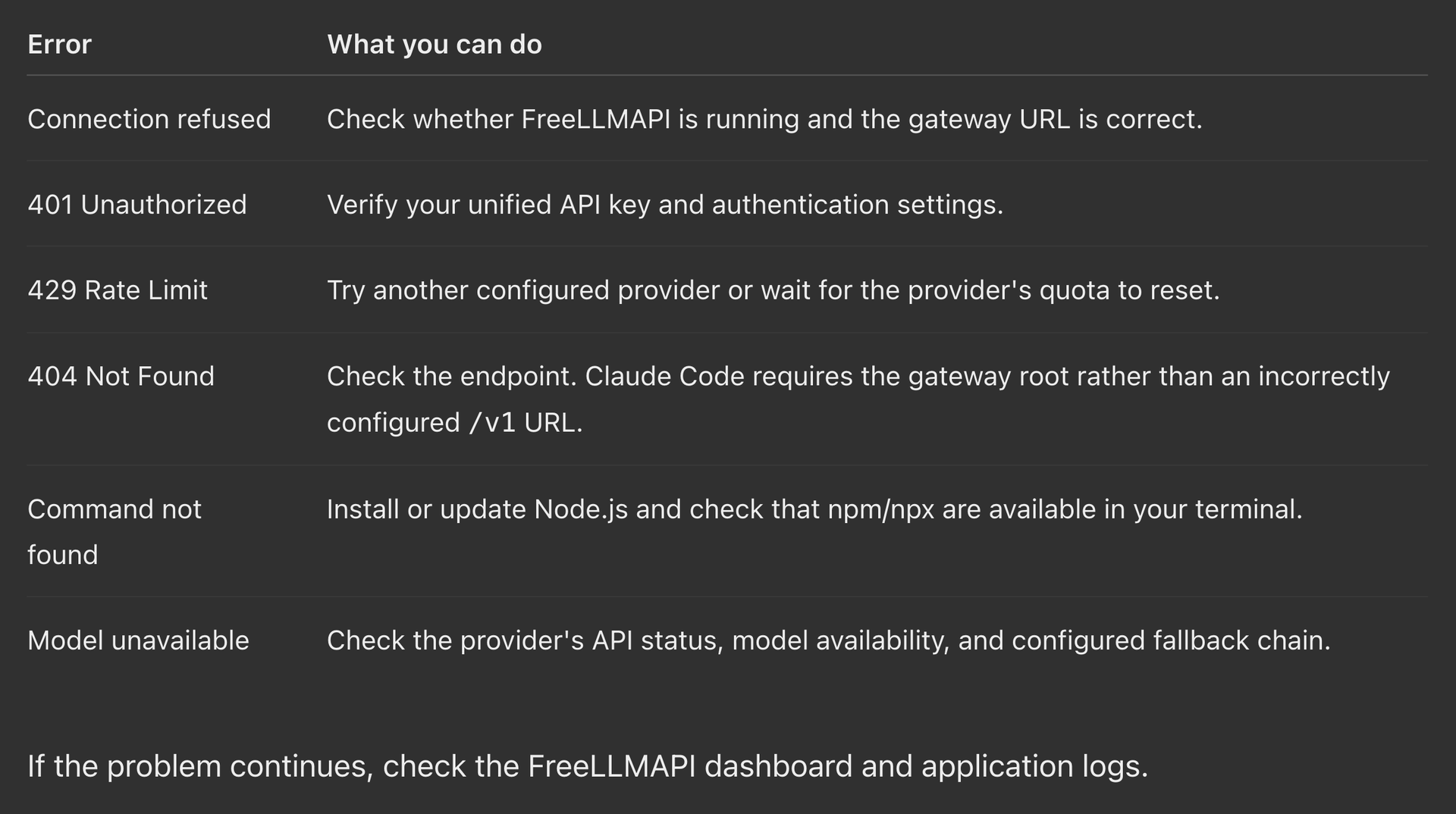
You can also test whether your local gateway is responding by opening http://localhost:3001 in your browser.
A useful tip: start with one working provider before adding several others. It makes troubleshooting considerably easier.
How Can You Make Money Using FreeLLMAPI and Claude Code?
Here is where things get interesting.
You don't necessarily need to be an experienced software developer to start exploring AI-assisted services. With the right workflow, Claude Code can help you build useful digital products and automate repetitive work.
Here are five practical opportunities.
1. Build websites for small businesses
Local businesses need websites, landing pages, enquiry forms, and product catalogues.
Use Claude Code to develop these projects faster, customise templates, and deliver affordable website development services.
2. Develop micro-SaaS products
Identify a small but recurring problem and build a focused solution.
Examples include invoice generators, appointment management tools, lead tracking systems, and simple reporting dashboards.
You can monetise these products through subscriptions or one-time purchases.
3. Sell AI automation services
Many small businesses still perform repetitive administrative tasks manually.
You could develop solutions for spreadsheet processing, report generation, lead organisation, email workflows, and data management.
Charge clients for implementation, maintenance, or monthly support.
4. Create digital products
Use AI-assisted development to build calculators, productivity tools, niche research applications, and specialised templates.
You can sell these through your website or digital marketplaces.
5. Build portfolio projects and freelance
If you're learning programming, build practical projects and publish them on GitHub.
Use these projects to demonstrate your abilities when approaching freelance clients or applying for development opportunities.
The real opportunity isn't simply accessing more AI models. It's using them to reduce development time and deliver something people are willing to pay for.
Is FreeLLMAPI Worth Trying?
If you're interested in AI development, coding agents, automation, or experimenting with different language models, FreeLLMAPI is certainly worth exploring.
Its biggest advantage is convenience. Instead of managing multiple API integrations separately, you get a central gateway with model routing and fallback capabilities.
However, don't confuse free API access with unlimited computing power. Provider quotas, model quality, response speeds, and availability can vary.
Also, avoid sending confidential client information or sensitive business data to third-party providers unless you have verified their privacy and data-handling policies.
Start with a small experiment, test different models, and identify which ones work best for your tasks.
Final thought: AI is becoming more accessible, but the people who benefit most will be those who know how to turn these tools into useful products, services, and solutions.
Explore FreeLLMAPI, experiment with Claude Code, and start building something practical.
Explore the tool: https://freellmapi.pro/
Official documentation: https://github.com/ou-pingping/FreeLLMAPI
Amit Thakkar
What if you could experiment with hundreds of AI models without purchasing multiple expensive subscriptions?
The AI industry is moving incredibly fast. Every few weeks, a new AI model appears promising better coding, faster responses, smarter reasoning, or more powerful automation. But there is one problem: accessing these tools often means managing multiple accounts, API keys, subscriptions, and usage limits.
For developers, freelancers, students, and AI enthusiasts, these costs can quickly become a barrier.
This is where FreeLLMAPI enters the picture.
FreeLLMAPI is an open-source AI model routing platform that brings multiple AI providers together through a single API gateway. Instead of configuring different connections for every AI provider, you can manage supported models through one interface and use them with compatible AI applications.
One particularly interesting application is connecting FreeLLMAPI with Claude Code, Anthropic's AI-powered coding agent.
Let's explore how it works, how to install it, and how you can turn this technology into a practical productivity or income-generating tool.
What Is FreeLLMAPI and Why Is Everyone Interested?
FreeLLMAPI is essentially a bridge between different AI model providers and the applications you already use.
Think of it as a central control room for AI models.
Instead of connecting separately to providers such as Google, Groq, Cerebras, NVIDIA, Mistral, and other supported platforms, FreeLLMAPI allows you to configure their API keys in one local gateway.
Its key features include:
- Multiple AI models: Explore models for coding, reasoning, writing, and other supported tasks.
- Unified API access: Connect compatible applications through a single endpoint.
- Automatic failover: When a provider reaches its rate limit or becomes unavailable, the router can try another configured provider.
- Local dashboard: Manage API keys, models, routing preferences, and usage.
- Claude Code compatibility: Connect supported third-party models to the Claude Code interface.
- Open-source software: The router itself is available under the MIT licence.
The interesting part is that you don't necessarily need a paid subscription to every provider. Several providers offer free API allowances, and FreeLLMAPI helps you manage those connections.
However, remember that free allowances depend on individual providers. The router is free, but that does not mean unlimited AI inference.
Why Should You Connect FreeLLMAPI With Claude Code?
Claude Code is an AI coding agent that can understand your codebase, modify files, debug problems, execute commands, and assist with software development.
Normally, using Claude Code involves Anthropic's supported authentication and model access.
FreeLLMAPI introduces another possibility: using the Claude Code interface with compatible models from other providers.
For example, you could experiment with a reasoning model for analysing a complicated programming problem, a faster model for routine coding tasks, and another model for generating documentation.
You get to experiment with different models without constantly changing your development environment.
Important: This does not unlock free Claude Sonnet or Claude Opus subscriptions. FreeLLMAPI routes requests to supported third-party models. Their capabilities, limits, and performance vary.
How to Install FreeLLMAPI
Getting started is relatively straightforward. There are different installation options depending on your operating system.
1. Windows installation
Windows users can start with the desktop installer.
Visit https://freellmapi.pro/
Open the download section.
Download the Windows installer or ZIP package from the project's official releases.
Install and launch the application.
Open the local dashboard.
The desktop application provides a convenient way to manage your local AI gateway without manually configuring every component.
2. macOS and Linux installation
If you already use Docker, you can install the server version using the official installation command.
First, make sure Docker is installed and running.
Open your terminal and execute:
curl -fsSL https://freellmapi.co/install.sh | bash
Once installation is complete, open:
http://localhost:3001
You should now be able to access your local FreeLLMAPI dashboard.
3. Connect your AI providers
This is an important step.
Open the dashboard and navigate to the Keys section.
Add API credentials from the providers you want to use. These could include supported services such as Google, Groq, NVIDIA, Cerebras, or other available providers.
You need to obtain API keys directly from the respective providers.
Once connected, FreeLLMAPI can manage these credentials and provide a unified API key for your applications.
Keep your API credentials private. Never publish them in GitHub repositories or public configuration files.
How to Use FreeLLMAPI With Claude Code
Now comes the interesting part.
Claude Code is the interface that will interact with your project, while FreeLLMAPI acts as the model gateway.
Before proceeding, install Claude Code separately using Anthropic's official installation instructions: https://code.claude.com/docs/en/overview
You should also have Node.js 20.18 or later available for the FreeLLMAPI command-line setup.
The complete workflow:
Install and launch FreeLLMAPI.
Add API keys from supported AI providers.
Copy your unified FreeLLMAPI API key.
Configure Claude Code to communicate with the local gateway.
Launch Claude Code and start building.
Connect Claude Code through the terminal
The project provides an automated configuration command.
For macOS and Linux, open your terminal and set your API key:
export FREELLMAPI_API_KEY="YOUR_UNIFIED_KEY"
First, preview the configuration changes:
npx freellmapi setup-claude \ --url http://localhost:3001 --dry-run
If the preview looks correct, execute:
npx freellmapi setup-claude \ --url http://localhost:3001
For Windows PowerShell, use:
$env:FREELLMAPI_API_KEY="YOUR_UNIFIED_KEY" npx freellmapi setup-claude ` --url http://localhost:3001 --dry-run
Remove --dry-run when you're ready to apply the configuration.
You can then launch Claude Code through the FreeLLMAPI launcher:
npx freellmapi launch
The launcher is designed to pass credentials to the Claude Code process without storing them in its configuration.
One important technical detail: Claude Code uses the Anthropic Messages API.
Its gateway address should be the server root, such as http://localhost:3001, not the OpenAI-style /v1 endpoint.
If you're using the desktop version, check its displayed Claude gateway URL. The desktop application may use http://127.0.0.1:31415 instead.
What Can You Build With It?
Once everything is connected, you can start experimenting with Claude Code and the models available through your gateway.
For example, try these prompts:
Build a website:
"Analyse my requirements and build a responsive landing page with HTML, CSS and JavaScript. Keep the code clean and mobile-friendly."
Debug an existing application:
"Inspect my project, identify potential errors, explain what is causing them, and suggest fixes before modifying any files."
Create an automation system:
"Build a Python script that reads information from a CSV file, organises the data, and generates a structured Excel report."
Create a business dashboard:
"Analyse this sales dataset and build a dashboard showing monthly revenue, best-selling products, and customer trends."
The important thing is to treat AI as a development assistant rather than blindly accepting everything it generates. Review the code, test the output, and verify important changes.
Common FreeLLMAPI Errors and How to Fix Them
You may encounter a few issues during installation or while connecting Claude Code.
Here are some common problems and their possible solutions.
You can also test whether your local gateway is responding by opening http://localhost:3001 in your browser.
A useful tip: start with one working provider before adding several others. It makes troubleshooting considerably easier.
How Can You Make Money Using FreeLLMAPI and Claude Code?
Here is where things get interesting.
You don't necessarily need to be an experienced software developer to start exploring AI-assisted services. With the right workflow, Claude Code can help you build useful digital products and automate repetitive work.
Here are five practical opportunities.
1. Build websites for small businesses
Local businesses need websites, landing pages, enquiry forms, and product catalogues.
Use Claude Code to develop these projects faster, customise templates, and deliver affordable website development services.
2. Develop micro-SaaS products
Identify a small but recurring problem and build a focused solution.
Examples include invoice generators, appointment management tools, lead tracking systems, and simple reporting dashboards.
You can monetise these products through subscriptions or one-time purchases.
3. Sell AI automation services
Many small businesses still perform repetitive administrative tasks manually.
You could develop solutions for spreadsheet processing, report generation, lead organisation, email workflows, and data management.
Charge clients for implementation, maintenance, or monthly support.
4. Create digital products
Use AI-assisted development to build calculators, productivity tools, niche research applications, and specialised templates.
You can sell these through your website or digital marketplaces.
5. Build portfolio projects and freelance
If you're learning programming, build practical projects and publish them on GitHub.
Use these projects to demonstrate your abilities when approaching freelance clients or applying for development opportunities.
The real opportunity isn't simply accessing more AI models. It's using them to reduce development time and deliver something people are willing to pay for.
Is FreeLLMAPI Worth Trying?
If you're interested in AI development, coding agents, automation, or experimenting with different language models, FreeLLMAPI is certainly worth exploring.
Its biggest advantage is convenience. Instead of managing multiple API integrations separately, you get a central gateway with model routing and fallback capabilities.
However, don't confuse free API access with unlimited computing power. Provider quotas, model quality, response speeds, and availability can vary.
Also, avoid sending confidential client information or sensitive business data to third-party providers unless you have verified their privacy and data-handling policies.
Start with a small experiment, test different models, and identify which ones work best for your tasks.
Final thought: AI is becoming more accessible, but the people who benefit most will be those who know how to turn these tools into useful products, services, and solutions.
Explore FreeLLMAPI, experiment with Claude Code, and start building something practical.
Explore the tool: https://freellmapi.pro/
Official documentation: https://github.com/ou-pingping/FreeLLMAPI
Amit Thakkar
19 November 2026