
What if you could have a team of AI agents to help with research, coding, lead management and repetitive business tasks, instead of relying on a single chatbot?
Meet OpenMausBot, an open-source AI agent platform inspired by Grok Bot. It brings multiple AI agents into a chat-style interface, where each agent can have its own model, instructions, connected apps and computer environment. It is an independent project, not an official product of xAI, OpenAI or Meta. Explore the OpenMausBot GitHub repository.
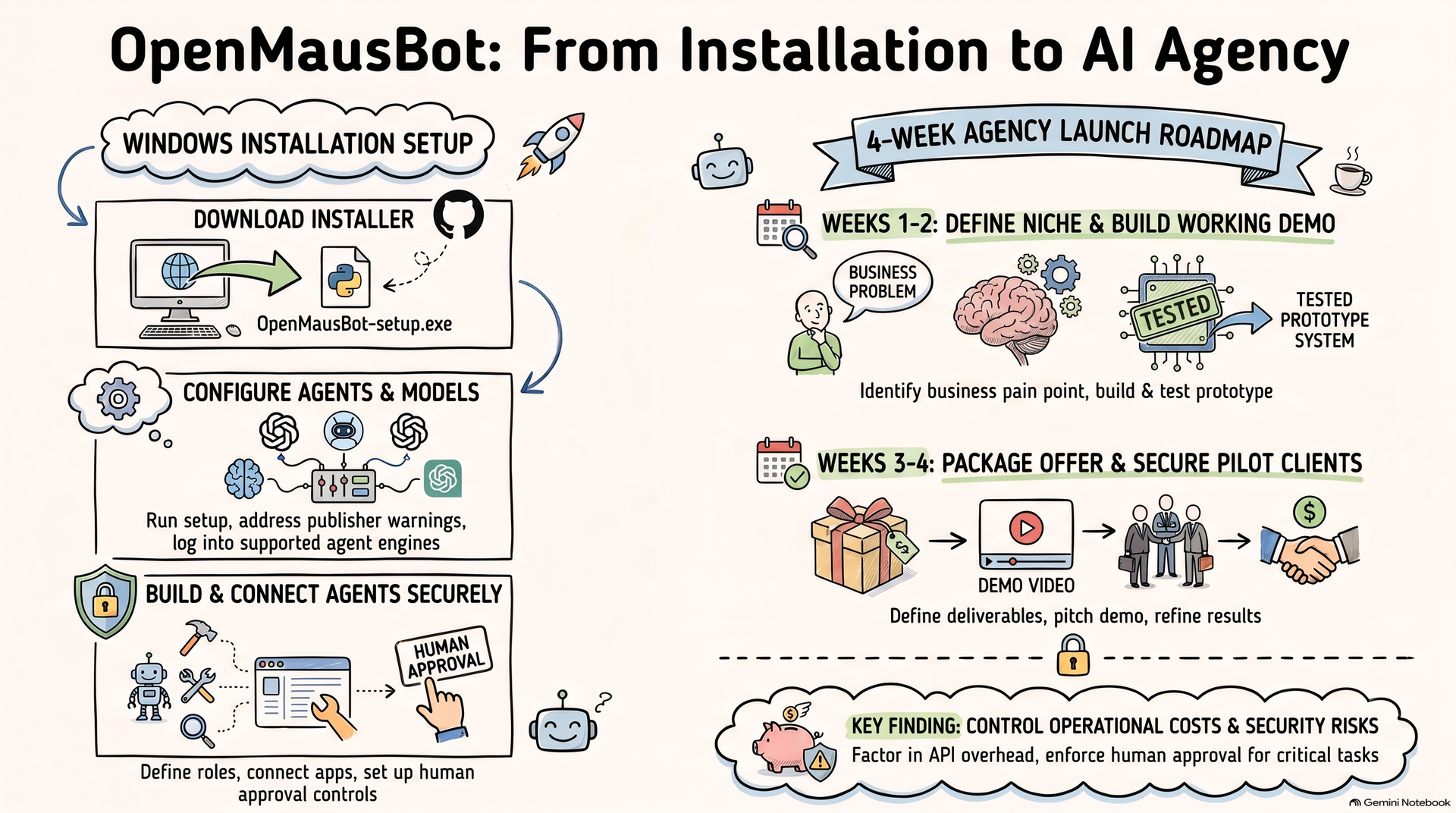
TLDR: Scroll to the Bottom of the Webpage for Infographic
1. What Is OpenMausBot?
OpenMausBot, also known as MausBot, is an open-source alternative to personal AI agent platforms. Instead of treating AI as one assistant that answers questions, it lets you organize multiple agents into a coordinated team.
Depending on your setup, agents can use supported AI models, work with connected applications, interact with computer environments and ask for approval before performing sensitive actions. The project supports integrations through Composio and includes options for local and cloud computer environments. Some capabilities depend on your operating system, configuration and third-party services.
Its key features include:
Multiple AI agents: Configure agents for different tasks and roles.
Different AI models: Use supported agent engines and model providers.
Connected applications: Integrate with services such as Gmail, Slack, GitHub and Notion.
Computer interaction: Let supported agents work in configured computer environments.
Approval controls: Review certain actions before allowing them to proceed.
Recurring routines: Schedule supported tasks to run automatically.
The software is open source, but that does not mean every AI model, API, cloud computer or integration is free. You may need existing subscriptions, API credits or paid services.
2. How to Install OpenMausBot on a Windows PC
The simplest route for most beginners is to use the official Windows installer rather than building the software from source.
Step 1: Open the official repository
Visit OpenMausBot on GitHub and open its latest release or the official download page linked in the README.
Step 2: Download the Windows installer
Download the Windows x64 installer, named OpenMausBot-setup.exe, from the official release.
Step 3: Install the application
Run the installer and follow the on-screen instructions. The project currently notes that its Windows installer is not code-signed, so Windows SmartScreen may show an unknown-publisher warning. Verify that you downloaded the file from the official project before deciding whether to proceed.
Step 4: Configure your AI access
Open the app and follow its setup instructions. Depending on your configuration, you may need to sign in to a supported agent CLI, such as Claude Code or Codex, or configure another supported provider.
Step 5: Create your first agent
Give the agent a clear role, such as research assistant, marketing analyst or coding assistant. Configure its model, instructions and tools, then test it with a small task.
Step 6: Connect applications carefully
Connect only the accounts and permissions needed for your task. Begin with sample data and require approval for consequential actions.
For updated installation instructions, operating-system requirements and troubleshooting, consult the repository's README and release notes.
3. Five Ways to Use OpenMausBot for Business
The most valuable use of AI agents is not generating more content. It is reducing repetitive work and improving how a business operates.
1. AI research agency
Create a research agent that gathers information from permitted sources and a second agent that summarizes the findings. Use a human review step to verify facts before delivering reports to clients.
2. Lead management and sales operations
Build workflows that organize incoming leads, categorize enquiries and prepare personalized follow-up drafts. Connect supported CRM or spreadsheet tools to keep records organized.
3. Content production agency
Use separate agents for research, outlines, first drafts and quality checks. A human editor should verify claims, brand voice and originality before anything is published.
4. Business reporting service
Automate recurring summaries from approved spreadsheets and business tools. Deliver weekly reports highlighting trends, outstanding tasks and questions requiring a human decision.
5. Internal workflow automation
Help small businesses connect applications, organize documents and automate routine administrative tasks. Start with low-risk workflows before attempting complex processes.
These are potential service models, not guaranteed income streams. Their value depends on the client's problem, implementation quality and measurable results.
4. How to Turn OpenMausBot Into an AI Agency
You do not need to launch a full-scale agency immediately. Start with one service for one type of customer.
Week 1: Choose a niche
Pick a market you understand, such as marketing agencies, coaches, recruiters, consultants or small online businesses.
Speak with potential customers and identify one repetitive task that consumes time or causes avoidable errors.
Week 2: Build a working demonstration
Use OpenMausBot to create a simple workflow addressing that problem. For example, build a lead-research system that organizes prospect information and prepares outreach drafts for approval.
Test it with realistic sample data. Track accuracy, time saved, running costs and the amount of human correction required.
Week 3: Create an offer
Package the solution as a clear service, such as:
AI lead-management workflow setup
AI research and reporting automation
AI-assisted content operations
Business application integration
Explain the outcome, deliverables, limitations and ongoing maintenance requirements. Price the service according to the value delivered and your actual costs.
Week 4: Find your first client
Create a short demonstration video and contact businesses that experience the problem you solved. Offer a limited pilot with clearly defined goals.
After delivery, collect feedback, measure the results and improve the workflow. Turn the successful implementation into a repeatable service.
Your long-term goal is to build reusable templates, onboarding processes, quality checks and maintenance systems, rather than rebuilding every solution from scratch.
5. Important Security and Cost Considerations
AI agents can make mistakes, misunderstand instructions or take unintended actions. Connected accounts and computer access can also introduce security risks.
Use separate test accounts where possible, grant minimum necessary permissions, protect API keys and require human approval before sending external messages, changing records or making purchases.
Also calculate the cost of AI subscriptions, API usage, hosting, integrations and support before quoting clients. Open-source software can reduce licensing barriers, but it does not eliminate operating costs.
Conclusion: Learn to Build Systems, Not Just Use AI
OpenMausBot offers an interesting way to explore multi-agent AI, application integrations and business automation. Its real value lies in what you can build with it.
Start by installing the software, creating one useful agent and connecting one workflow. Then solve a genuine business problem, document the results and offer the solution as a focused service.
The opportunity is not simply to sell AI. It is to help businesses get useful work done more reliably.
Learn the tools, prove the value and build from there.